


About ReFaMo 3 (Render Farm Monitor):
ReFaMo
is a stand alone software, suitable for
controlling
and checking the status of any network configuration. From a small office with only
3 PC�s to a huge office with 1000+ machines.
The new ReFaMo 3
is by far more polished than any previous version a complete update to our leading cluster monitoring solution.
ReFaMo 3 has been re-designed and re-written from the ground up. . Not only
have we integrated many often requested features by our customers, such as
grouping, VNC, search, improved node selection and better management, but the
entire user interface has been reworked to be less cluttered, more intuitive,
and far more responsive.
|
ReFaMo 3
What's New |
|
-
Grouping: Flexibility to
control and monitor various Group
Systems. Users can override (Energy
settings, Global
wake/restart/shutdown and CMD
options).
-
New
UI: New faster UI with faster
response time. Easier to control and
monitor.
-
Rename
Machines - Nodes:
Ability to rename WINS or IP address
for better identification.
-
VNC Option
-
Automatic Search:
Automatically add PC's IP range.
Option to add only machines with
ReFaMo Node.
-
Automatic Node Update:
All machines will be
automatically updated with the
latest ReFaMo Node.
-
Custom CMD: User can store
command line executes.
-
New System Graph Plane:
Embedded Graph Option new UI and
colors.
-
All
Windows Operating Systems:
(tested: Win XP-Vista 32bit/64bit,
2003Server & 2008 Server
32bit/64bit)
-
Group your systems for better
management.
The new ReFaMo is based on groups,
sorted in a tree-link structure. Each
group can contain as few or as many
machines as you like, accept
commands such as 'shutdown', 'wake',
and execute remote commands on
its members, whether they are
machines or other groups inside it.
On the main display, a group shows
the average stats of the machines
and groups it contains. Moving
machines and groups around is a
breeze, so you can dynamically
assign groups based on their
location, task, or any
criteria that you need according to
your own workflow. All
settings are now inherited, so that
you can use one set (the global
settings) for everything, derive
group-level configurations, or
simply override certain
settings for any arbitrary group or
machine. (The reverse
also works: You can change the
settings for a whole range of
machines by overriding their
settings from a parent group!)
-
Work faster and more intuitively
through the new user interface.
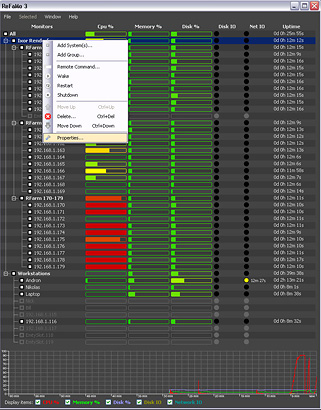
The user interface is no longer a flat list, but a tree, meaning
that you can view your groups and
machines in as coarse or detailed
layout as you choose. It makes
viewing huge machine clusters of
hundreds or even thousands of machines intuitive and quick. You can re-assign groups and
machines by just visually dragging
and dropping between them with the
mouse. You can click on
headers to auto-sort machines
alphabetically, by CPU, memory or
disk load, or you can manually place
each machine in each group.
The graphing for each system is now
integrated and slipstreamed into the
main window and you can view the
graph for whatever group or machine
is currently selected.
-
Identify systems easily through
labeling
Machines are no longer solely
identified by their WINS or IP
address. You can now click on their
name on the tree and give them a
descriptive name which you can use
to better identify them. Their
actual address is now defined in
their property sheet. Speaking
of which, changing the properties of
a group or machine now just restarts
the monitoring for itself and its
children and does not affect the
other monitored nodes.
-
Access a remote system in multiple
ways: RDP, screen view, and
introducing VNC!
ReFaMo now supports three options to
access a remote machine: The usual
Remote Desktop Login, now updated to
be better compatible with XP SP3,
Vista, and Server 2008, the
traditional view-only screen capture
feature, and now it additionally
features an integrated VNC client to
support legacy systems or, for
instance, offer remote functionality
to users who need to have access
without locking a user from their
own session.
-
Select and control systems easily
Selecting and issuing commands has
never been easier: You can now send
commands to an individual machine,
by group, or select various machines
and issue the command to those.
In addition, selected machines can
be moved to a specific group, or
just removed from the list of
monitored systems. The
selection process is intuitive and
straightforward. Click on the
checkbox for a machine and it is
selected, click again and it's not.
Clicking on a group's checkbox will
select the entire group, or
un-selecting will clear all selected
children too.
-
Simply and quickly add many nodes
You can add systems into a group by
entering its WINS name, IP address,
or specify a range of names and
addresses to add. You can do
this through a visual editor or just
type a shorthand expression for
speed. This makes it a snap to
add monitoring for hundreds of
machines in a few clicks. In
addition, you can scan a range of
names or addresses to add only the
machines which are running the
ReFaMo node software already.
-
Have instant control
The methods that ReFaMo uses to scan
and connect to monitors has been
completely reworked and we can now
connect and monitor systems much,
much faster than the previous
version. Only a few second
after startup, ReFaMo can know the
state of hundreds of machines on
your local network and connect to
those who are active. In
addition, startup times have been
improved and the CPU footprint for
ReFaMo has been reduced. For
you the bottom line is getting
things done much faster.
-
Upgrade your entire cluster with one
click
Instantly deploy upgrades of the
ReFaMo node applet to every
monitored machine without need for
manual intervention. ReFaMo
will detect if nodes need upgrades
and prompt you to auto-upgrade each
one. In case of a bug-fix or
new feature release, you can install
the new ReFaMo on your workstation
and let it upgrade your entire
infrastructure with just one click.
-
Have ReFaMo blend
into your desktop
In addition to the translucent,
border(-less), and coloring modes,
ReFaMo now supports custom theming,
allowing you to tailor its
appearance to match whatever color
or style you prefer. Simply
open the theme editor and visually
chose the colors you would like for
each class of component, such as
background color, active color, and
so forth. Click on preview to get a
better look on how it will appear
before committing to it.
|
|
Features List:
Monitoring & Status: |
-
Real Time CPU Monitor - Color Gradient and
Percentage % CPU Load Indication
-
Real Time Memory Monitor - Color Gradient
and Percentage % Memory Limit Indication
-
Real Time Hard Disk Monitor - Color Gradient
and Percentage % Capacity Indication
-
Real Time Hard Disk IO (Activity) Monitor -
On/Off Indication
-
Real Time Network IO (Activity) Monitor -
On/Off Indication
-
Uptime Monitor - Days, Hours, Minutes and
Seconds
-
If disk I/O takes a long time, a counter
appears next to the machine's 'led' and
shows how long this has been going on. We
found this helpful in checking for memory
overflows where there is swap thrashing.
-
All the above with Real Time Multi PC
Monitoring, Status and Control. (Home
Network, Business, Cluster, Renderfarms
etc).
-
High Scalability. No KVM switch or other
hardware required.
|
|
Features List:
Control & Manipulation: |
-
You can add and remove monitored machines. Set resolution
screen and color depth for each node.
-
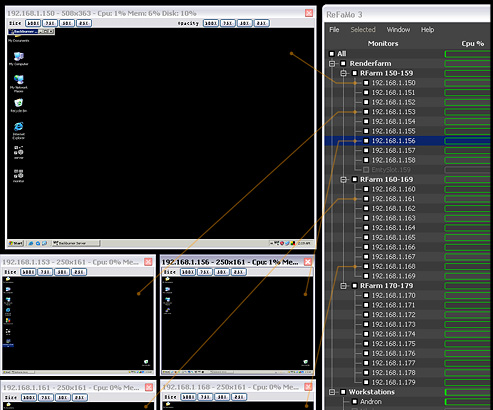
Remote Login - Clicking on the IP addresses
or the PC name of each machine brings up a
desktop window.
-
Clicking on any of the meters (CPU%,
Memory%, Disk%) brings up a history graph
for the past hour for the given meter. You
can see Node Totals Graph and many PC graphs
at the same time.
-
If you hover the mouse over anything you
will get extra "bubble" information.
-
Node Command Line Execute. Very useful for
running any command line action. (e.g. Real
Flow, Maxwell, Vue etc...) With the Global
CMD feature you can now copy / paste files
and update your renderfarm in minutes
instead of hrs.
-
Wake On Lan Button. Remote Start of the
RenderFarm machines (Nodes). - With
confirmation & Global setting.
-
Restart the RenderFarm machines (Nodes). -
With confirmation & Global setting.
-
ShutDown the RenderFarm machines (Nodes). -
With confirmation & Global setting.
-
Transparency Window (100%, 75%, 50% and 25%)
and Resolution(100%, 75%, 50% and 25%) for
monitored machines.
-
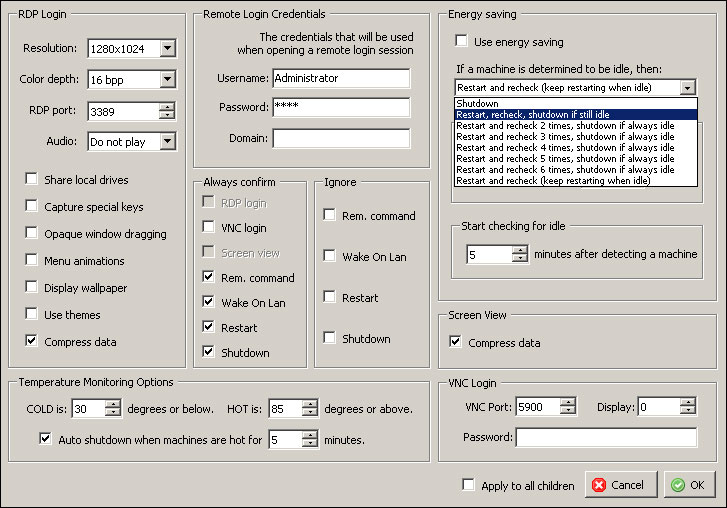
Energy Saving Feature with system override
option.
-
Global commands (reconnect all nodes,
reboot, shutdown and command line)
|
|
 
Copyright �
Ixor3D & IXORVFX Inc. All Rights Reserved. |